Showing posts with label OAC DV. Show all posts

Wednesday, May 15, 2019

Available to download - Oracle Data Visualization Custom PLUGIN Butterfly

Excited to announce that a 3rd custom PLUGIN I have been working on is available to download and start using now - available on


The Oracle Analytics Library: https://www.oracle.com/solutions/business-analytics/data-visualization/extensions.html


Within the Extensions tab


or download here


Name of Viz: Butterfly Chart

Authors: G.Adashek & D.Flores


Description:

The Butterfly chart, also sometimes known as a tornado bar chart allows to compare 2 data sets side-by-side.
This provides a quick analysis of variances and is a simple comparison chart.
Use the tooltip in this custom viz to easily show the variances.


Saturday, April 20, 2019

New Version Oracle Data Visualization Desktop 12c (12.2.5.2.0)

There is a NEW Oracle Data Visualization Desktop version 12.2.5.2.0 now available!


Download the latest version of Oracle Data Visualization desktop - here


https://www.oracle.com/middleware/technologies/oracle-data-visualization-desktop.html#


#keratoconus


Saturday, March 23, 2019

Available to download - Oracle Data Visualization Custom PLUGIN Vertical Waterfall

Excited to announce that a 2nd custom PLUGIN I have been working on is available to download and start using now - available on

The Oracle Analytics Library: https://www.oracle.com/solutions/business-analytics/data-visualization/extensions.html


Within the Extensions tab

or download here


Name: Vertical Waterfall

Authors: G. Adashek & D.Flores

Description:

The Vertical Waterfall is the ‘tipped’ (top-to-bottom) version of what many know as the traditional horizontal (left-to-right) Waterfall chart. 

By rotating the visualization 90 degrees clockwise, this allows for easy to read text along the y-axis spine of the visualization.


Monday, August 6, 2018

Available to download - Oracle Data Visualization Custom PLUGIN "Elbow" Dendrogram

Excited to announce that a custom PLUGIN I have been working on is available to download and start using now - available on

The Oracle Analytics Library: https://www.oracle.com/solutions/business-analytics/data-visualization/extensions.html

Within the Extensions tab

or download here


Name: "Elbow" Dendrogram

Authors: G. Adashek & D.Flores

Description:
The “Elbow” Dendrogram creates a hierarchy based Parent-Child like structure with ‘links-arms’ that are bent at a 90° angle. This plugin can render a #measure element and is zoomable.

Sunday, April 29, 2018

Spring Fever .. OAC .. Major League Baseball

It is that time of year again --

when spring is upon us
the snow starts to melt
the birds chirp outside the window in the morning .. 
and the Major League Baseball season begins ⚾

As I am getting ready for presentations, I wanted to share a few neat visualizations .. a little bit of a sneak peak.

CAN'T WAIT for anyone who wants to attend to see the full finished product!


Custom Plugin CollapsibleTree

WITH DATA (#measure)


WITHOUT DATA (#measure)


This is still one of my favorite visualizations!

DimPlayer is my favorite combo visualization!


And now that the 2018 MLB season is underway, it is time to update the ALL_MLB_STATS Essbase cube with 2017 data :)


A nice night & weekend little project is about to get started!! Stay tuned


Thursday, February 15, 2018

OAC - Essbase .. WRITEBACK via OAC - DV!!

OAC - Essbase WRITEBACK IS ALIVE!


Well, the day has finally arrived, Essbase Writeback in the cloud is real .. and a thing 😎🤓🤓😎


Let's get into the how-to and what it looks like.


But first, a BIG shout out to Gary Crisci for being able to battle the patch frontier and slay the OAC demons!


OAC - Essbase patched to version 109 .. skipped right over 108 to specifically Version 12.2.1.1.109 - Build 126


Steps to success


  • Create an Essbase cube in OAC (thought that this step and a few others might be obvious ..)


https://www.oracle.com/solutions/business-analytics/data-visualization/library.html


  • Find the Custom Plug-In: Essbase Write-Back plugin by Oracle


  • Click Download to Download the zip file


  • Log into the OAC - DV/BI instance


  • Go to Console


  • On the panel, click Custom Plugins


  • Upload the saved Custom Plugin from the step above, drag and drop or click "Upload Custom Plugin" and select the zip file


  • On the panel, click Safe Domains


  • Click, "add domain"


  • Domain Name: enter * (wildcard)
  • Check all of the boxes: Image, Frame, Script, Font, Media, Connect


  • Sign Out of OAC DV/BI
  • Sign back into OAC DV/BI
  • Navigate to Data Sources / Create / Connection / Oracle Essbase (Beta)
>>> When does this Connection Type not say (Beta)! <<<


Connection Details:

*New Connection Name: "Your Essbase Server"

*DSN: IP or host:Port /essbase /agent
ex. http://my.IP.address:80/essbase/agent

*Username: <AdminUsername>

*Password: <AdminPassword>

*Authentication: Always use this credentials??

  • Click 'Save'


From the OAC - DV/BI Home

  • Click Create .. Data Set ..
  • Select the Newly created Connection
  • Select the Essbase Cube that is a part of that Connection that you want
  • Click 'Add'


You should see a notification "The Data Set was successfully saved."


  • Now go ahead and create a Project
  • Select the cube you added as a Data Source of the "Essbase Server" above
  • Create your visualization adding the dimensions .. ALL of the dimensions
  • Change the Visualization..


  • Select the "Essbase Writeback" Viz


Now your Viz looks more like a reporting grid 😀 .. go ahead and double click a data cell .. and enter/change data .. Click 'Submit'


In this case I changed Sample Basic
Budget Sales May 400-10 Wisconsin from 90 to 100


Nice to see the cell change color to the muted yellow similar to either Workspace or Smart View

You should now get an inline popup window that is asking to re-validate the credentials in order to accept the data change being submitted to the cube..


Target Database Detail:
Should all be the same credentials that were used above
ex. http://my.IP.address:80/essbase/agent
*Username: <AdminUsername>
*Password: <AdminPassword>

  • Click 'Fetch'
  • Click the dropdown arrow for Application and make your selection
  • Click the dropdown arrow for Database and make your selection
  • Click 'OK'

.. and your grid should "Refresh" .. wait for it

and now be updated with the new data value(s) saved in the cube!!!!


Coming soon .. a blog post about the latest version of

Cube Designer Version 12.2.1.1.109 Build 126


Saturday, November 18, 2017

OAC Essbase & DV Hit Play


Have to say that I am really liking the OAC DV and the custom Plug-Ins that you can easily download and drag and drop the zip file!


I mentioned a few of them in my prior post with the Tree Viz and the Row Expander


This is another custom plug-in that is really fun to use, Dim Player

Again, a few
Easy Prep Steps:

  • Navigate using your favorite browser to -> https://www.oracle.com/solutions/business-analytics/data-visualization/library.html
  • Click the 'Plug-ins' tab
  • Find the Plug-in that you are interested in adding to your set of visualizations
  • Download the Zip file


Here are a few tips to make sure that you are able to properly use this plug-in

You need to have a Dimension with the Dimension Type = Time (required)


Years dimension is shown with a clock 🕒


Start creating your Project, select your dataset(source), visualization.. add measure(s) etc.

Next you want to navigate on the left menu column and click the vertical bar icon for Visualizations.


Scroll to find your next viz to add, in this case DimPlayer, drag it onto your canvas


The magic of this plug-in is that it uses the Time tagged dimension as the Play Axis


In my MLB cube, I have the Years dimension, drag the desired Generation in as the PlayAxis


But we are not ready. We need to ensure a few more items.

Open the 'menu' of this newly added viz.


Click/check ' Use as Filter'


You also have the ability to change the speed of the refresh rate of the viz, just use the interval and key-in +/- the # of seconds you would prefer.


You are now ready to Just.Hit.Play

All of the MLB Homeruns hit over time in approx. 1min!


Sunday, November 5, 2017

OAC Data Viz & BI + New DBX v12.2.1.1.108

It has not been that long since the Halloween  👻  💀  🎃  holiday season.
So let's have a little trick or treat spirit to this blog post shall we.

And in that spirit, we will only be getting tips and treats and less on the tricks. 🍬 🍭 🍫

Let's begin.

As per one of my prior posts, I was able to 'connect' OAC DV/BI to OAC -Essbase and the amazingly fun Major League Baseball cube (And Yes I owe a few of you a copy of the Oracle Cube Designer for Excel model)

🍬  Fun Fact: the format for these Workbooks is called DBX format (Structured Excel)
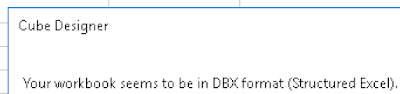


🍭  It is also worth mentioning that there is also a New version of the Cube Designer Extension available to download and install; 12.2.1.1.108 Build 117

There are a few updates to note in this version:

  • Member Formula validation
  • Hierarchy Viewer Duplicate Member Outline Support
  • Transform Data enhancements


Moving on. OAC DV/BI

I will be using the MLB STATS cube that I created to share my examples.

I noticed that there are a number of Visualizations already available, nice, but there are also more Plug-ins that can be easily download/uploaded for your use as well.

Easy Prep Steps:

  1. Navigate using your favorite browser to -> https://www.oracle.com/solutions/business-analytics/data-visualization/library.html
  2. Click the 'Plug-ins' tab
  3. Find the Plug-in that you are interested in adding to your set of visualizations
  4. Download the Zip file

🍫  Next Steps within OAC DV/BI:


Login ;) -> http://<your IP address>/va/?pageid=home

Click 'Console'


Click 'Custom Plugins'


Either 'Upload Custom Plugin' or drag-and-drop the downloaded zip file into OAC
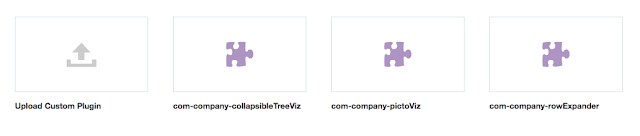


Time to create your New Project and add one of these newly added Custom Plugins


One of the ones that I recently got feedback "That is REALLY cool!" was the use of the 'Collapsible TreeViz' Plugin.



This Plugin does NOT require a #Measure! Take a look.

This example was for the MLB World Series matchup between the Dodgers and the Astros.
Looks like the list of Teams aligned to the Active Franchises of the Dodgers is 9 and the Astros is 3.
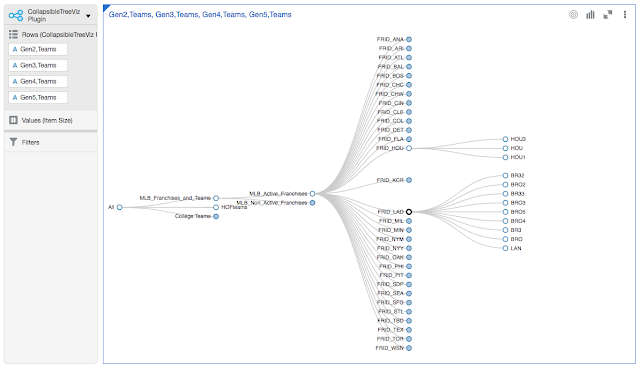


This in my opinion IS REALLY COOL!
Wonder what it would look like against DRM?!?! I might need to create that as a Data Source.


Another Custom Plugin that I added was 'RowExpander'


There are times in DV that I want to see my data easily in an expandable Tree View (Hierarchy). My dataset is naturally 'built' that way in Essbase. And I want an easy way to navigate my dataset accordingly.

To simplify my example, I filtered the data to only include Players that Last Names begin with 'AA'.
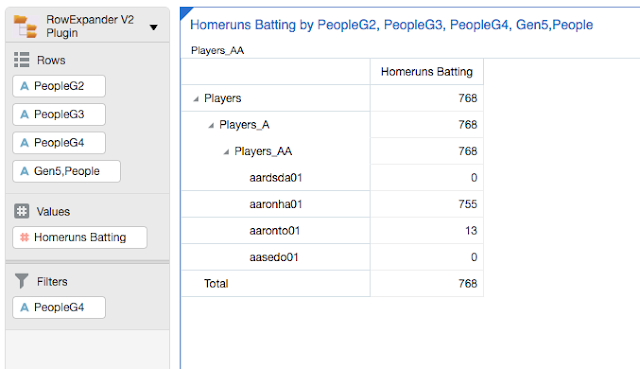


Notice that there is a 'carrot-arrow' symbol '>' next to each row member that is available for expansion. This makes me feel a little nostalgic and creating HFR reports .. checking the checkbox to 'Allow Expansion'. Maybe it is just me and the good ole days of learning to use it, and, well .. since it has stood the test of time of it's look and feel of 1997 .. But I would like to have HFR available in OAC to create highly structured and formatted reports, books and even batches, that is, at least for Essbase, Planning, or other EPM datasources created in OAC. One can only hope, although, HFR is now only Web version supported and no more desktop client installer (HFR desktop client install, you were my nemesis! Hope you rode off into the sunset of product installers well my friend). I digress.

So, for me the Player above with 755 Career Homeruns is obvious. Do you know who this MLB Player is?


Another Fun Fact in closing this post.
In order to see my Viz/analysis via Smart View, I needed to create Reports using the Classic OBIEE  Designer.

Only then was I able to create a Smart View connection, see the repository and add these objects into Office (Excel, PowerPoint, Word).


Until next time. Stay safe while using OAC. Your Alias Table(s) might not be  👻   😞   🙁  👻