Showing posts with label Patch. Show all posts

Thursday, February 15, 2018

OAC - Essbase .. WRITEBACK via OAC - DV!!

OAC - Essbase WRITEBACK IS ALIVE!


Well, the day has finally arrived, Essbase Writeback in the cloud is real .. and a thing 😎🤓🤓😎


Let's get into the how-to and what it looks like.


But first, a BIG shout out to Gary Crisci for being able to battle the patch frontier and slay the OAC demons!


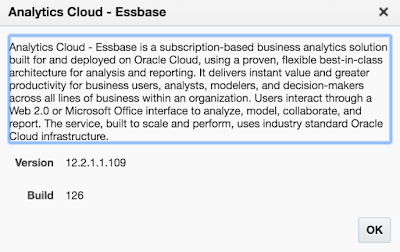
OAC - Essbase patched to version 109 .. skipped right over 108 to specifically Version 12.2.1.1.109 - Build 126


Steps to success


  • Create an Essbase cube in OAC (thought that this step and a few others might be obvious ..)


https://www.oracle.com/solutions/business-analytics/data-visualization/library.html
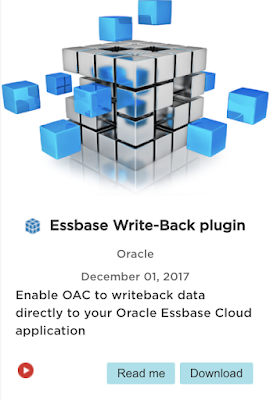

  • Find the Custom Plug-In: Essbase Write-Back plugin by Oracle


  • Click Download to Download the zip file


  • Log into the OAC - DV/BI instance


  • Go to Console


  • On the panel, click Custom Plugins


  • Upload the saved Custom Plugin from the step above, drag and drop or click "Upload Custom Plugin" and select the zip file


  • On the panel, click Safe Domains


  • Click, "add domain"


  • Domain Name: enter * (wildcard)
  • Check all of the boxes: Image, Frame, Script, Font, Media, Connect


  • Sign Out of OAC DV/BI
  • Sign back into OAC DV/BI
  • Navigate to Data Sources / Create / Connection / Oracle Essbase (Beta)
>>> When does this Connection Type not say (Beta)! <<<


Connection Details:

*New Connection Name: "Your Essbase Server"

*DSN: IP or host:Port /essbase /agent
ex. http://my.IP.address:80/essbase/agent

*Username: <AdminUsername>

*Password: <AdminPassword>

*Authentication: Always use this credentials??

  • Click 'Save'


From the OAC - DV/BI Home

  • Click Create .. Data Set ..
  • Select the Newly created Connection
  • Select the Essbase Cube that is a part of that Connection that you want
  • Click 'Add'


You should see a notification "The Data Set was successfully saved."


  • Now go ahead and create a Project
  • Select the cube you added as a Data Source of the "Essbase Server" above
  • Create your visualization adding the dimensions .. ALL of the dimensions
  • Change the Visualization..


  • Select the "Essbase Writeback" Viz


Now your Viz looks more like a reporting grid 😀 .. go ahead and double click a data cell .. and enter/change data .. Click 'Submit'


In this case I changed Sample Basic
Budget Sales May 400-10 Wisconsin from 90 to 100


Nice to see the cell change color to the muted yellow similar to either Workspace or Smart View

You should now get an inline popup window that is asking to re-validate the credentials in order to accept the data change being submitted to the cube..


Target Database Detail:
Should all be the same credentials that were used above
ex. http://my.IP.address:80/essbase/agent
*Username: <AdminUsername>
*Password: <AdminPassword>

  • Click 'Fetch'
  • Click the dropdown arrow for Application and make your selection
  • Click the dropdown arrow for Database and make your selection
  • Click 'OK'

.. and your grid should "Refresh" .. wait for it

and now be updated with the new data value(s) saved in the cube!!!!


Coming soon .. a blog post about the latest version of

Cube Designer Version 12.2.1.1.109 Build 126


Sunday, December 10, 2017

Smart View Release 11.1.2.5.720 & More

Happy to see another version of the Smart View for Office Add-in release! 11.1.2.5.720

You can go and download the patch set update PSU 26783864 here

And the Readme as well.

Documentation: Oracle Smart View for Office Documentation Release 11.1.2.5.720

There are a number of New Features added in this release, very exciting!

Take a look at the list:


Based on the first update, and specifically about Smart Query, I am going to have to go back to the post that I have had pending as a draft for a long long time ..

But at the moment, what does this update look like?


This give you a better way to manage all queries, modify, rename, run, etc.


Cascade Members from Multiple Dimensions

When selecting multiple members for a single dimension in the POV, now when you decide to cascade the report, a new dialog box appears kindly asking not only about the 'multi-members' but also the additional dimensions!! :)

I would be careful with this option,
you can see from the info stat that the number of sheets going to be cascaded for this is 3


This slight modification is going to cascade 36!!


After I clicked okay, my Windows machine was going haywire to say the least. There was flashing, cursor jitter, scroll bar shaking, the Excel window was '(Not Responding)' and turned black. There is good news. The queries all finally finished running and the workbook updated all 36 new query sheets and added them to the workbook.


HsGetValue Accepts Additional Data Types

This was something that as I was using the Cube Designer found interesting. I could create the Smart Lists from the wizard/workbook, create and load them into the cube, but not be able to easily validate that the lists looked as desired.

[HsGetValue] - {syntax to be updated here}


New Essbase Option for Preserving Comments and Unknown Members


Unknown members and comments for OAC users.
Also note that this option is found in the Smart View / Options / Member Options tab (Not the Data Options tab)


Extension Update Process has been streamlined!!

Now when you go into Smart View / Options / Extensions a new dialog box
appears when you click the hyperlink "⚠️  Check for Updates, New Installs, and Uninstalls"


This is great! Now that I have established a connection I can use that or any other connections/locations to find updates. Select and click 'Get Updates'


In real time you will see the job running the check for updates, etc. the location used to check.
Once complete, you can close the window and see in the Extension list if there is indeed an update available.


Like these Smart View Extension 11.1.2.5.720 updates:

Oracle Journals


OracleBI EE!


Smart Query


Detailed blog posts to follow!

Since it has been snowing now for a few days here where I live,
I think it is appropriate to say officially that #WinterIsHere!


Friday, July 7, 2017

PSA - Microsoft Add-Ins Don't Load

- PSA -

This is a Public Service Announcement to all of you with Add-Ins in Microsoft Office products. More specifically 2016 and Add-Ins that don't or will not load when opening the program application (Excel, Word, etc).

It came to my attention that the add-in utility SV ++ that is available on this blog was not loading for some users 
- thank you Kyle B. & Peter.

Seems that there was an update issued by Microsoft. It was a security related patch and the fix can be found here but the curious part is that this was issued over a year ago, and then there was another update about 6-months ago. So, not really sure why no impact then .. and now all of a sudden. But no worries, hope this fixes the issue now if you run into it.

Below is the way to solve the issue per the superuser blog:

"With this update, we changed the behavior of Excel so that it will not load certain file types (including .xlam) when they are untrusted. The easiest workaround is to find the add-in that is causing you trouble, right-clicking on it in Windows Explorer, and checking Unblock"

"An easier approach is to simply place the add-in in a Trusted Location (in Excel, go to File > Options > Trust Center > Trust Center Settings > Trusted Locations), such as the following folder, and load it from there:
C:\Users\%USER NAME%\AppData\Roaming\Microsoft\Excel\XLSTART"


Hope this PSA helps if you run into the issue.


Again, to learn more, you can visit here

This is a message from the cloud.